How we built Transloadit agent skills

Give an agent an MCP server or a CLI and it can create Assemblies, upload files, and run transforms. But ask two sessions to "encode this video to HLS" and you get different sequences of calls, different error handling, and different assumptions about which Template to use and where to place outputs.
Agent Skills fix all of that. They are version-controlled markdown playbooks that prescribe what to do, in what order, and how to verify the result.
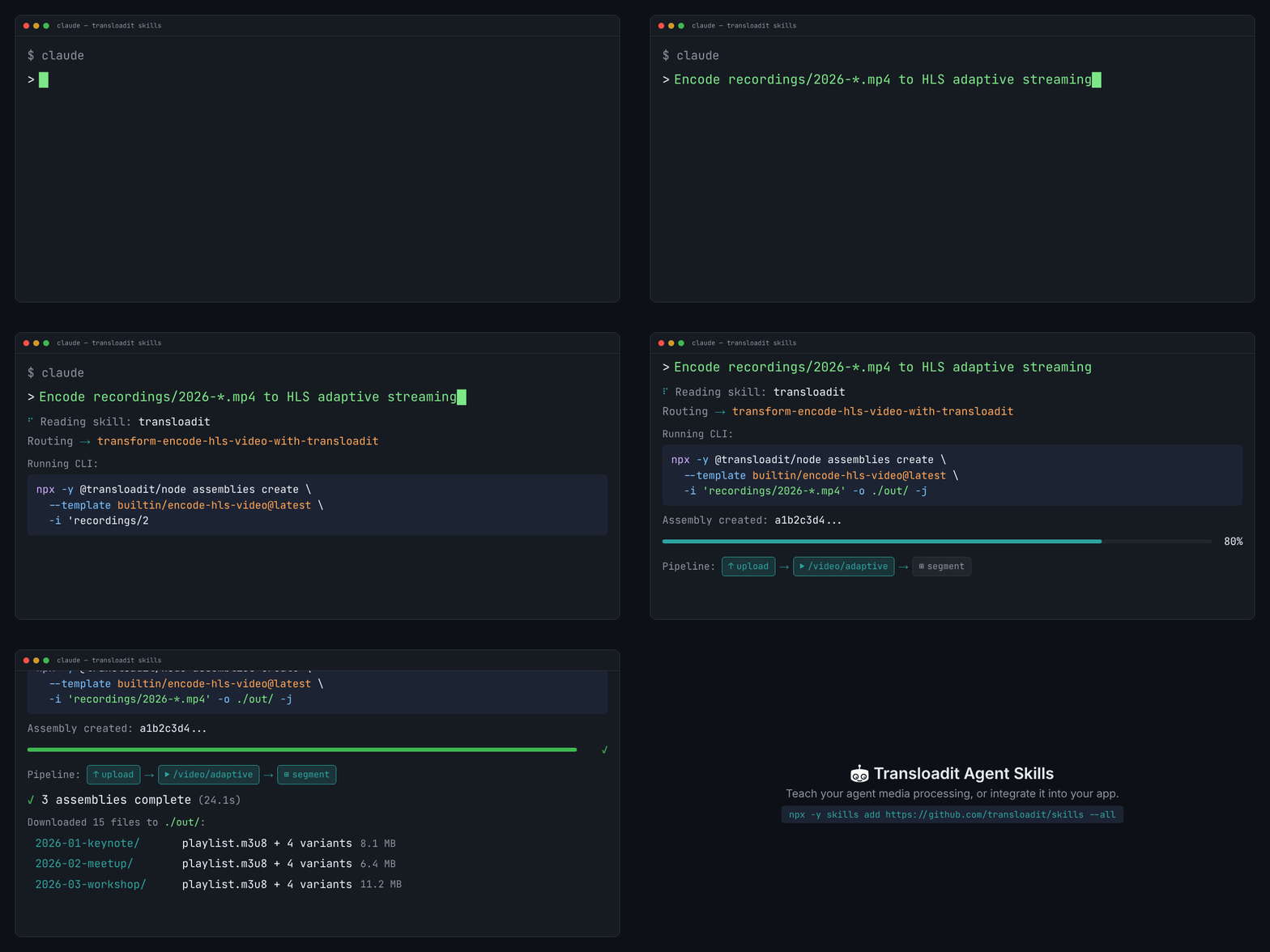
We shipped Transloadit Agent Skills: a small catalog of
SKILL.md files covering media processing workflows from HLS encoding to Uppy integration. The
catalog has evolved since launch, but the design lessons here still hold.
The agent skills standard
Anthropic introduced Agent Skills in December of 2025. A
skill is a directory with a SKILL.md file: YAML frontmatter (name, description) and a markdown
body with instructions. Agents discover skills automatically. Claude Code looks in
.claude/skills/, Codex in .codex/skills/, Cursor in .cursor/skills/.
The format is simple on purpose. A skill is not a new runtime or framework. It tells an agent what to do with the tools already in its environment. Because skills are plain files in your repo, they go through code review like everything else.
OpenAI adopted the same SKILL.md format in openai/skills for
Codex. Microsoft published microsoft/skills for Azure and
Copilot. Vercel built the npx skills CLI to install
skills across more than 35 agent platforms.
What we built
At launch, the catalog centered on three categories:
Reference
docs-transloadit-robots– offline lookup for Robot parameters and examples. Agents use this to draft or validatestepsJSON without guessing.
Transforms (one-off processing, outputs downloaded locally)
transform-encode-hls-video-with-transloadit– HLS encoding. Local video in, adaptive streaming playlist out.transform-generate-image-with-transloadit– AI image generation. Prompt in, image file out.
Integrations (scaffold code into a real app)
integrate-uppy-transloadit-s3-uploading-to-nextjs– add Uppy Dashboard and Transloadit uploads to a Next.js app, with server-side signature generation and optional S3 export.integrate-asset-delivery-with-transloadit-smartcdn-in-nextjs– add Smart CDN URL signing to a Next.js project for on-the-fly image and video delivery.
A top-level transloadit skill acts as a router (more on that below). For the current catalog, see
the repo and discovery index rather than treating this launch snapshot as exhaustive.
The router
Instead of dumping the whole catalog into the agent's context, the transloadit skill reads the
request and dispatches to the right one:
- Need reference (robot params, examples, no API calls) →
docs-transloadit-robots - Need a one-off transform (download outputs locally) →
transform-* - Need an end-to-end code integration →
integrate-*
The agent picks up the router automatically, the router picks up the sub-skill, and each sub-skill is narrow enough that the agent follows one path instead of improvising.
Deterministic CLI
Left to its own devices, an agent will hallucinate flags, pick the wrong Template, or
forget to download outputs. We saw this repeatedly during development. Every transform-* skill
prescribes one specific command:
npx -y @transloadit/node assemblies create \
  --template builtin/encode-hls-video@latest \
  -i ./input.mp4 \
  -o ./out/ \
  -j
The Builtin Templates (builtin/encode-hls-video@latest) encode our best practices, so the agent
does not compose Assembly Instructions from scratch. The -o flag downloads results to a
local directory instead of leaving them behind a temporary URL. And npx -y avoids global installs
and version mismatches.
Testing with try-skill.ts
A skill that reads well, but produces broken code is worse than no skill. We built
try-skill.ts to catch
that. It validates each integration skill end to end:
- Copy a clean starter project into an isolated directory.
- Inject the skill into an agent (OpenAI Codex) running in fully autonomous mode.
- Let the agent apply the skill: writing files, running commands.
- Run the project's end-to-end tests against the result.
Each skill has acceptance criteria. The Uppy integration skill, for example, must actually upload a PNG through the Uppy Dashboard and confirm a Transloadit result comes back. No mocks.
When tests failed, we tightened the wording, added more explicit paths, and reran. Most of the iteration time went here. The skills themselves read like developer guides; no test-specific instructions leak in.
When to use skills vs MCP
We also shipped a Transloadit MCP Server that gives agents direct runtime access to Transloadit tools. The difference is straightforward: MCP provides agents with abilities (create Assemblies, list Templates, upload files), while skills teach agents how to use those abilities well (which Template to pick, what flags to pass, where to put outputs).
In practice, MCP fits autonomous pipelines where Transloadit runs repeatedly. Skills fit human-directed, one-off jobs like setup, scaffolding, or a one-time encode. A skill can also instruct the agent to call MCP for execution, or fall back to the CLI when MCP is not available.
For the full comparison and setup instructions, see the AI Agents documentation.
Install
npx skills add transloadit/skills
This installs all six skills. The skills are also auto-discoverable via
/.well-known/skills/index.json, following the
Agent Skills Discovery specification:
npx skills add https://transloadit.com
For manual installation, clone or symlink the transloadit/skills repo:
| Agent | Path |
|---|---|
| Claude Code | .claude/skills/ |
| OpenAI Codex | .codex/skills/ |
| Gemini CLI | .gemini/skills/ |
| Cursor | .cursor/skills/ |
| Windsurf | .codeium/windsurf/skills/ |
See the AI Agents documentation for detailed client configuration.
What is next
We want to add more transform skills (audio transcription, document conversion) and cover frameworks beyond Next.js. If there is a workflow you need, open an issue.